
Data Entry
Add Business/Organization
#Overview
This document outlines the process for adding a business or organization as a borrower, including the required Know Your Customer (KYC) information.
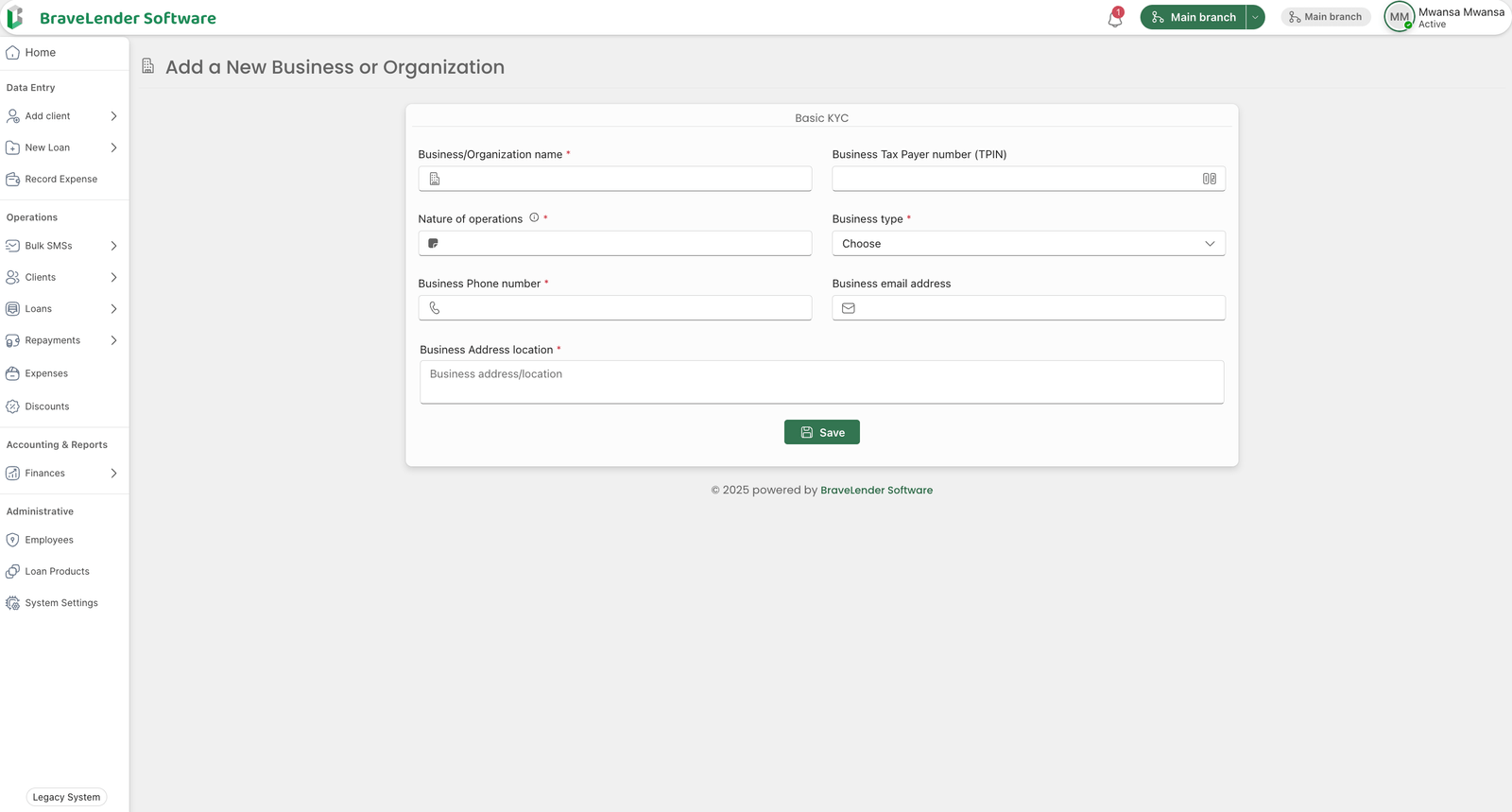
#Required KYC Information
To add a business or organization as a borrower, the following details must be provided:
- Business/Organization Name - The registered name of the business or organization.
- Business Taxpayer Number (TPIN) - A valid taxpayer identification number.
- Nature of Operations - A description of the business activities.
- Business Type - The classification of the business (e.g., Sole Proprietorship, Partnership, Limited Company, NGO, etc.).
- Phone Number - A valid business contact number.
- Email Address - The official email address of the business.
- Address Location - The physical or registered business address.
#Steps to Add a Business or Organization Borrower
#Step 1: Log in to the BraveLender
- Log in to the BraveLender using your credentials.
- Navigate to the "Add Client" section under "Data Entry".
- Click on the "Business/Organization" button.
#Step 2: Enter Business KYC Information
- Fill in the required details:
- Business/Organization Name
- Business Taxpayer Number (TPIN)
- Nature of Operations
- Business Type
- Phone Number
- Email Address
- Address Location
#Step 3: Validate Information
- Ensure that:
- The business name is unique and correctly spelled.
- The Business Taxpayer Number (TPIN) is valid.
- The nature of operations is well-defined.
- The business type is correctly selected.
- The phone number and email address are in the correct format.
- The address location is complete and accurate.
#Step 4: Submit Business Information
- Click on the "Submit" or "Save" button.
- The system will validate and store the business details.
- If there are errors, correct them based on the validation messages and resubmit.
#Step 5: Confirmation and Record Storage
- Once successfully added, the business borrower will be recorded in the system.
- A confirmation message will be displayed.
- Optionally, notify the business via email or SMS about the registration.
#Notes
- Ensure the Business Taxpayer Number (TPIN) is accurate to comply with tax and financial regulations.
- Maintain confidentiality and security of business data.
- Businesses may be required to provide additional supporting documents based on lending policies.
#Conclusion
Following these steps ensures the proper registration of a business or organization as a borrower, enabling efficient loan processing and compliance with financial regulations.