
Operations
Viewing Loan Repayments
The BraveLender allows you to view and manage loan repayments efficiently. Repayments are categorized by their statuses to help you track and manage them effectively. This guide will walk you through the steps to view loan repayments on the system.
#Repayment Status Categories
Loan repayments in the system are categorized into the following statuses:
- Pending Review: Repayments that have been submitted but are awaiting review and approval.
- Approved Repayments: Repayments that have been reviewed and approved.
- Declined Repayments: Repayments that have been reviewed and declined due to errors or other issues.
#Steps to View Loan Repayments
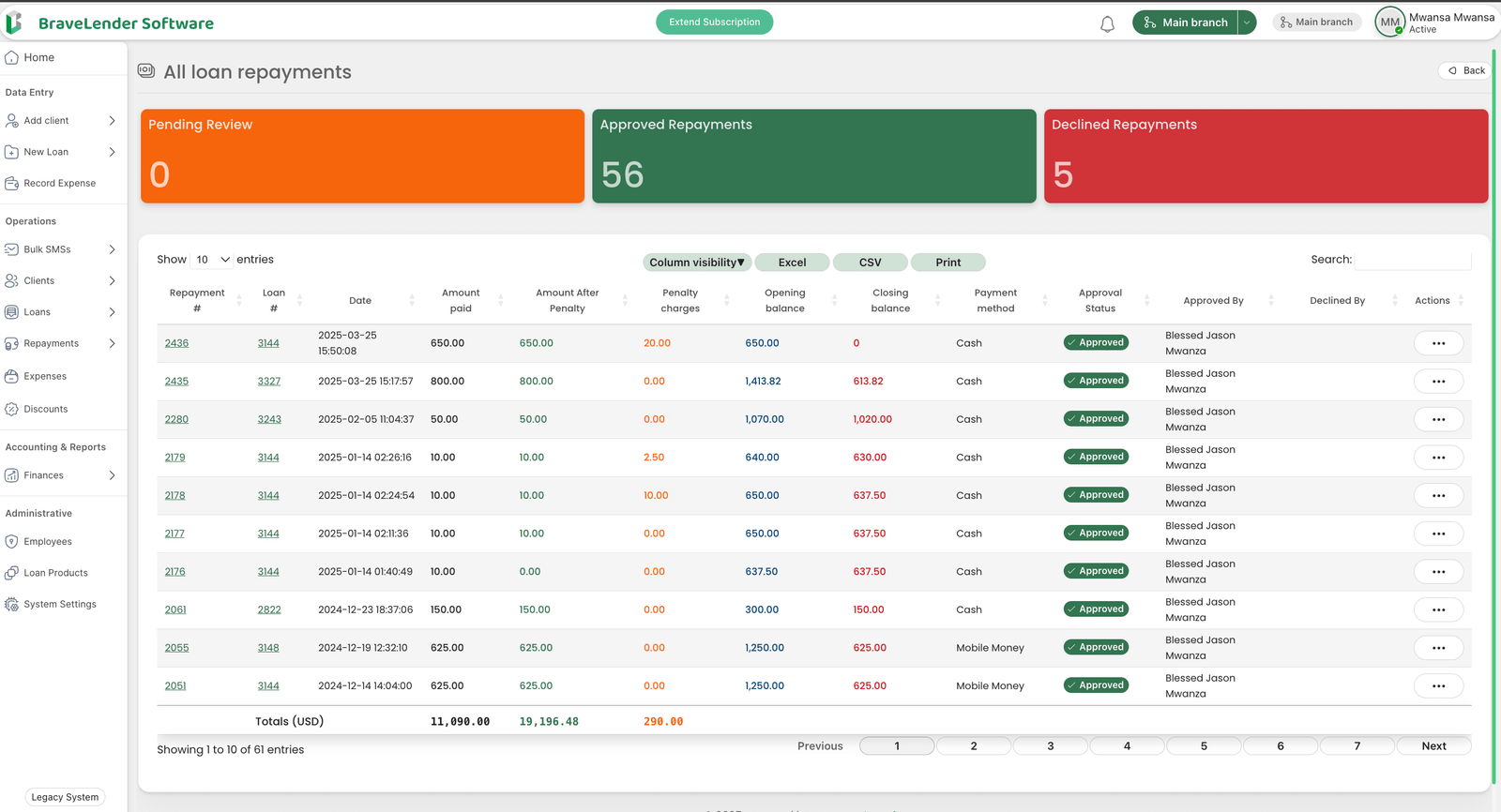
#Step 1: Access the Repayments Section
- Log in to the system using your credentials.
- Navigate to the Repayments section under "Operations".
#Step 2: View Repayment List
- Click on the View Repayments tab.
- A list of all repayments will be displayed, including:
- Repayment ID
- Borrower Name
- Loan Number
- Repayment Amount
- Repayment Date
- Repayment Status
#Step 3: Filter Repayments by Status
- Use the Status Filter to view repayments based on their status:
- Pending Review: Displays repayments awaiting review.
- Approved Repayments: Displays repayments that have been approved.
- Declined Repayments: Displays repayments that have been declined.
#Step 4: Search for Specific Repayments
- Use the search bar to find specific repayments by:
- Borrower Name
- Repayment ID
- Loan Number
- Date Range
#Step 5: View Repayment Details
- Click on a repayment entry to open detailed information.
- The repayment details page includes:
- Borrower Information
- Loan Details (e.g., loan number, outstanding balance)
- Repayment Amount and Date
- Repayment Status and Notes
- Reason for Decline (if applicable)
#Step 6: Export Repayment Records
- Click on the Export button to download repayment records in CSV, Excel, or PDF format.
- Select the desired format and save the file to your device.
#Notes
- Ensure you have the correct access permissions to view repayment records.
- Use filters effectively to find relevant repayment details quickly.
- If a repayment entry appears incorrect, verify its details or contact the administrator for corrections.
#Conclusion
By following these steps, you can efficiently view and manage loan repayments on the system, categorized by their statuses. This ensures accurate financial tracking and reporting.