
Administrative
Add Loan Products
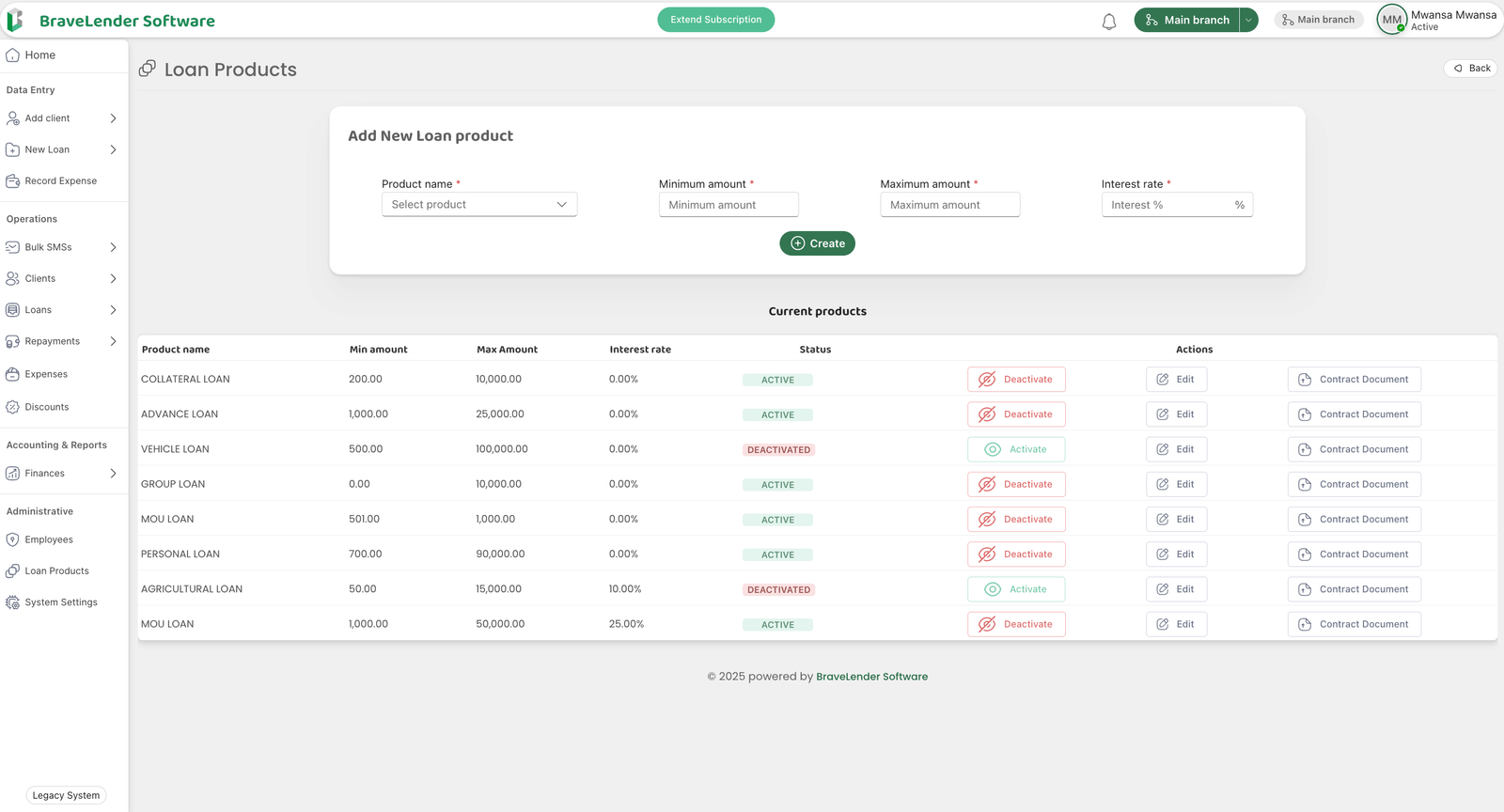
The BraveLender platform allows administrators to define and manage loan products. This guide will walk you through the steps to add a loan product, including specifying the product name, minimum and maximum loan amounts, and interest rate.
#Steps to Add a Loan Product
#Step 1: Access the Loan Products Section
- Log in to the system using your administrator credentials.
- Navigate to the Administrative section on the dashboard.
- Click on Loan Products.
#Step 2: Open the Add Loan Product Form
- On the Loan Products page.
- This will show the loan product creation form.
#Step 3: Enter Loan Product Details
- Fill in the required details for the loan product:
- Product Name: Select the product name from the dropdown menu (e.g., Personal Loan, Business Loan, Group Loan).
- Minimum Loan Amount: Enter the minimum amount that can be borrowed for this product.
- Maximum Loan Amount: Enter the maximum amount that can be borrowed for this product.
- Interest Rate: Specify the interest rate for the loan product (e.g., 5%, 10%).
#Step 4: Save the Loan Product
- Review the entered details to ensure accuracy.
- Click the Create button to add the loan product to the system.
#Step 5: Confirm Loan Product Creation
- A confirmation message will appear once the loan product is successfully added.
- The new loan product will now be listed on the table below the form on the Loan Products page.
#Notes
- Ensure that the product name is descriptive and aligns with the organization's loan offerings.
- Set realistic minimum and maximum loan amounts to meet borrower needs while managing risk.
- Verify the interest rate to ensure compliance with organizational policies and regulations.
#Conclusion
By following these steps, you can efficiently add and manage loan products on the system. This ensures that the platform is tailored to your organization's financial offerings and borrower requirements.